Free receipt maker for your small business

Create and send professional receipts to your customers with our free receipt generator. Save time managing your small business. Enter your customer information, and download or print the receipt now. No email is required for free receipt maker.

receipt maker
your image
#
Item
Quantity
Rate
Amount
$
$
$
$
$
$
$

Your PDF is ready

Your document has been prepared and is ready to download.

Get more value with our sales receipt software

Create sales receipt anywhere

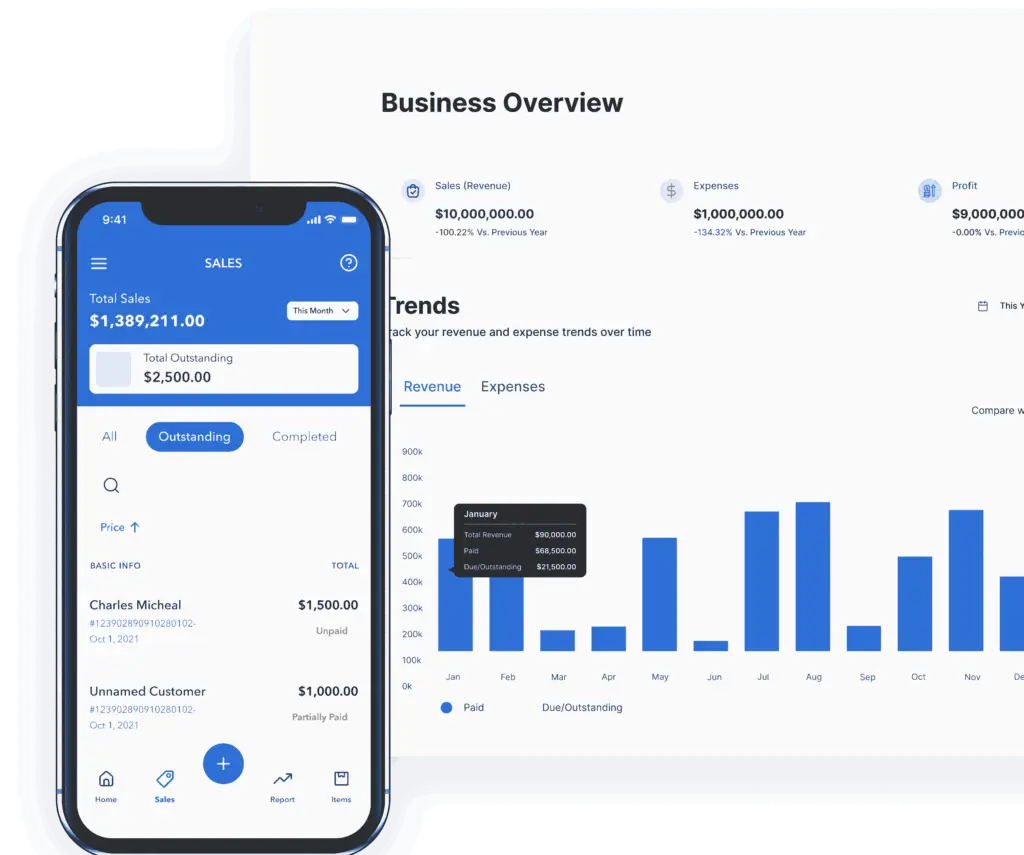
Create and store professional sales receipts with the Vencru mobile app. If you record sales at the counter, use our free point of sale software. Businesses that want receipts, payments, inventory, and accounting connected can use Vencru’s POS and accounting software.
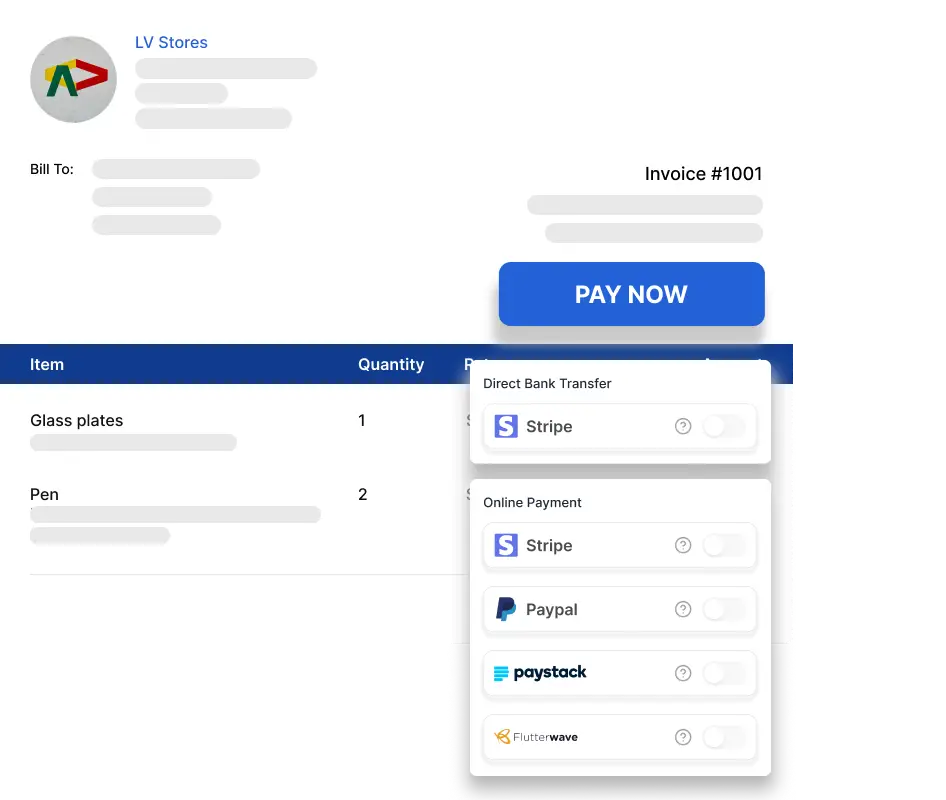
Screenshot of Vencru's Invoice generator software with online payment gateway (Stripe, Paypal, Paystack, Flutterwave)

Free receipt maker vs Vencru POS and accounting software

Use the free generator when you need a one-off PDF receipt. Choose Vencru when you need to save customers, record sales, track payments and debtors, update inventory, and keep accounting reports current after every transaction.

Features Free receipt generator Vencru POS & accounting
Cost $0 Use Online Generator $0 Get Started Free
Editable Green Tick Green Tick
Printable Green Tick Green Tick
Downloadable Green Tick Green Tick
Email to Clients Green Tick Green Tick
Unlimited Receipts, Invoices, Estimates, and Inventory tracking Green Tick
Accept Online Payment Green Tick
Track Invoice Status Green Tick
Track Sales & Debtors Green Tick
Create and Send Invoices from Your Mobile Device - Anywhere Anytime Green Tick
Get Business Insights and Accounting Reports Green Tick

Setup your free account to get started

What is a Receipt?

A receipt is proof of payment for goods and services purchased and paid upfront. 

What is a receipt maker or cash receipt generator?

This generates professional-looking receipts, which you send to your customers. Below are some additional information about using the Vencru generator:

How to make a receipt in 4 steps

  1. Add your business details. Upload your logo, then enter your business name, address, email, and phone number so the customer knows who received the payment.
  2. Add the customer and sale. Enter the customer details, receipt number, transaction date, and each product or service sold. Include quantities, prices, discounts, shipping, and tax when they apply.
  3. Record the payment. Enter the amount paid. For a deposit or partial payment, show the remaining balance and add the payment method or reference in the notes.
  4. Review and download. Check the names, totals, tax, payment amount, and balance, then download the finished receipt as a PDF and send or print it for the customer.

The receipt maker is free to use, and no email address is required to create a one-off receipt.

The benefits of using a free receipt maker

When you make use of our free and easy-to-use cash receipt generator, you can:

  • Save yourself lots of time and effort in creating a receipt from scratch.
  • Save client information against subsequent usage.
  • At the click of a button, change generated receipts into invoices.
  • Keep an organized system and track receipts.
  • Print out, and access your sales receipts from any part of the world as all data is safely stored online.
  • Get an overview of your business with little or no effort.
  • Use professionally designed templates by experts.

Receipt types you can create

Choose the receipt format that matches how the customer paid:

  • Cash receipt: confirm the cash amount received, transaction date, items purchased, and any change returned.
  • Card receipt: record the sale total and payment method. Do not place a full card number or security code on the receipt.
  • Deposit receipt: show the deposit amount, what it applies to, and the remaining amount due.
  • Partial-payment receipt: record the amount received, the original total, and the balance still outstanding.

What information should a receipt include?

A practical receipt normally includes a unique receipt number, seller name and contact details, transaction date, customer details when needed, a description of each item or service, quantity and price, discounts, applicable tax, total paid, payment method, and any remaining balance.

Legal and tax requirements vary by market. For example:

  • Canada: GST/HST-registered businesses must clearly show the tax charged or state that the total includes GST/HST. See the Canada Revenue Agency guidance.
  • United Kingdom: a simplified VAT invoice for an eligible sale of £250 or less includes the seller’s name, address, VAT number, tax point, description, VAT-inclusive total, and VAT rate. See HMRC VAT guidance.
  • Australia: businesses must provide proof of transaction for purchases over $75 and for lower-value purchases when requested. It should include the business name and ABN or ACN, date, product or service, and price. See the ACCC receipt guidance.

These examples are general information, not legal or tax advice. Check the rules that apply where your business operates before relying on a generated receipt for compliance.

Frequently Asked Questions about the Receipt Creator

Click the choose file button under Company Logo to upload or drag and drop an image into the logo slot. 

Note, it must either be a JPEG or PNG image.

Yes, we do. Here is the link to our invoice generator or download Vencru’s free invoice templates

No, they are 100% unbranded.

You can do this by downloading it or sending via email as a PDF document.

Yes. The default format is PDF format.

Over 243 countries have access to our template.

Yes. Automatically all information on both your receipts and clients is available for download. To store receipt, you can use the Vencru app

Yes. The asterisk fields are the most needed information to get you the best of our receipt generator template.

How can Vencru be of service to you?

Vencru is a free software that helps with invoicing, accounting, and managing sales, clients, vendors, inventory, and business reports.

At Vencru, we understand how much time you spend on the calculation, compilation of various receipts, and accounting documents. Thus, we are here to make life in business less stressful and more relaxing.

Access more free tools for your business

Accounting Templates

Easily manage your financial records with pre-designed templates for tracking income, expenses, and profits.

Inventory Templates

Keep track of your products and stock levels effortlessly using templates designed for efficient inventory management.

Expense Templates

Stay organized by recording and categorizing your business expenses with user-friendly templates.

Purchase Order Generator

Streamline your purchasing process with our generator that helps you create purchase orders smoothly.

Invoice Templates

Create professional invoices quickly and accurately using customizable invoice and receipt templates for easy billing.

Estimate Generator

Provide accurate project cost estimates with ease using our convenient and simple estimate maker.

Get the free receipt maker app for your business

Send receipts to clients, automatically track sales, manage inventory, and get accounting reports. Vencru is available across all your devices (Web, Android, and iPhone)

Screenshoot of mobile and desktop view of Vencru's accounting software