Free Purchase Order Templates
Create clear, professional purchase orders for your suppliers. Choose a template built for small business, wholesale, or retail—then download it in Excel, Word, or PDF.
Pick your purchase order template
Start simple, or use a template with the fields retailers and wholesalers need when buying stock.
Simple Purchase Order
A clean PO for everyday supplier orders, services, and small business purchases.
Wholesale Purchase Order
Built for SKUs, cases, bulk quantities, supplier terms, and warehouse orders.
Retail Purchase Order
Useful for product restocks, variants, SKUs, quantities, and expected arrivals.
Do you create purchase orders often?
Skip the spreadsheet. Create, send, and track POs with products, suppliers, inventory, and vendor bills connected.
Your template is ready.
No account required. The download is not gated by the next question.
What kind of business are you buying inventory for?
What is a Purchase Order (PO)?
A purchase order (PO) is a formal document, either paper-based or digital, that a buyer sends to a seller to confirm their intent to purchase specific goods or services. Think of it as an official authorization confirming your order. When the seller accepts the PO, the transaction becomes binding. A PO clearly outlines the items or services you need, the quantities required, agreed-upon prices, payment terms, and expected delivery dates.
Retailers
Use purchase orders to formally request products like clothing, electronics, or craft supplies from suppliers, ensuring accurate restocking ahead of new seasons or upcoming sales.
Learn about the Top 5 Purchase Order Systems for RetailersWholesalers
Use POs for bulk quantities, delivery dates, and warehouse orders. Rely on POs to document large-scale purchases from manufacturers, specifying quantities often measured in pallets or containers and clearly communicating delivery expectations to their warehouses.
Small businesses
Organize purchases such as supplies, materials, equipment, and services. Use purchase orders to organize purchases ranging from office supplies and production materials to specialized services from contractors.
Learn more: Purchase Order Software for Wholesalers and Retailers
Your template creates the PO. Vencru manages what happens next.
Track the order, receive stock, create the vendor bill, and keep inventory and accounting connected.
- 01START HERE
Create the PO
Confirm products, quantities, costs, and terms.
- 02NEXT
Send supplier
Share the purchase order with your vendor.
- 03THEN
Receive shipment
Record what arrived against the original order.
- 04THEN
Update inventory
Move received products into available stock.
- 05LAST STEP
Create vendor bill
Turn the received order into a supplier bill.
Benefits of Creating Purchase Orders
Purchase orders add structure to the buying process. They help small businesses, retailers, and wholesalers confirm what was ordered and keep purchasing records easier to follow.
Formalize supplier orders
Confirm products, quantities, prices, and terms before the supplier ships the order, reducing misunderstandings and costly errors.
Track incoming inventory
Keep a record of what is expected to arrive, which is useful for retailers planning restocks and wholesalers managing larger inventories.
Keep clearer financial records
Use the PO as supporting documentation for business spending, supplier bills, bookkeeping, and later reconciliation.
Related guide: Top purchase order systems for retailers
Download Your Free Purchase Order Template
Use our free, professionally designed purchase order templates, crafted specifically for small businesses, retailers, and wholesalers. Say goodbye to uncertainty and clearly confirm your orders with an intuitive, easy-to-use template.
- Simple and Clean Design: User-friendly layout, ideal even for those new to purchase orders.
- Clearly Labeled Fields: Easily identify where to input supplier information, item specifics, and payment terms.
- Built for Customization (Excel and Word): Effortlessly add your logo, brand colors, or additional columns tailored for your business, such as sizes and color variations for retailers or lot numbers for wholesalers.
- Printable and Digital Options: Choose Excel for seamless digital record-keeping or PDF for quick and convenient print-and-fill tasks.
Available Formats
Editable and useful for detailed digital purchasing records, reusable supplier orders, and calculations.
No signup required. Choose a file format and use the template as often as you need.
From supplier request to a clear PO in minutes
Your supplier should be able to see exactly what you want, what you agreed to pay, and where the order should go.
Add buyer & supplier details
Include both businesses, contact details, PO number, and order date.
List products and quantities
Add SKUs, product details, units, cases, quantities, unit costs, and discounts.
Set terms and delivery
Confirm payment terms, delivery address, expected date, tax, freight, and notes.
Send and track the order
Email the PO to your supplier and keep a copy so you can match it to what arrives.
Related guide: Top purchase order systems for retailers
A better PO for wholesalers and retailers
The right fields depend on how you manage stock. Switch the example to see what matters most.
Order bulk inventory without losing the details
A wholesale PO should make bulk quantities, pack sizes, supplier terms, and receiving expectations clear before the goods leave your supplier.
- SKU and supplier SKU
- Cases, units per case, and total units
- MOQ and volume pricing
- Expected delivery date and warehouse
- Freight, currency, and payment terms
Brightline Distributors
Save time creating POs with Vencru
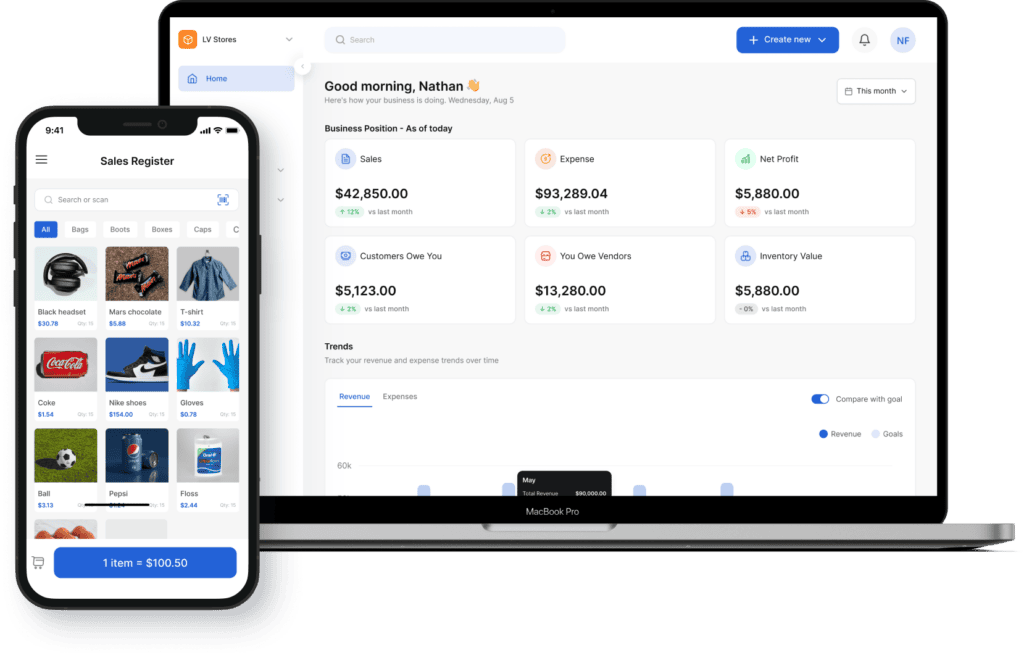
Vencru connects purchasing to suppliers, inventory, and accounting. Instead of filling out spreadsheets, use Vencru to generate purchase orders automatically based on each inventory's needs. With just a few clicks, your purchase order can be emailed, ready to download, or print - no formatting or editing required
| Capability | PO Template | Vencru |
|---|---|---|
| Create a professional PO | ✓ Yes | ✓ Yes |
| Reuse supplier details | Manual | ✓ Saved supplier records |
| Add products you already stock | ✗ No | ✓ Select from inventory |
| Track open purchase orders | ✗ No | ✓ Central PO list |
| Track stock that has arrived | ✗ No | ✓ Yes |
| Create the vendor bill | ✗ No | ✓ 1-click convert |
| Update stock after receiving | ✗ No | ✓ Automatically updated |
| Keep purchasing and accounting books connected | ✗ No | ✓ Yes, automatically |
Purchasing and inventory without the duplicate work
We run a small warehouse with a lot of moving parts. Vencru made it easy to stay organized. What impressed me even more is their customer service - real people who actually reply and fix things. They even helped me set up the system properly. That kind of support is rare these days.
I tell all my friends about Vencru. The application is so easy to use and the support team is always available to help address questions and issues
I run a physical store and online store - so it’s important my inventory is accurate and consistent. I also love the detailed sales reports. My accounting is up to date and it’s just the beginning of the year. Their customer support is top notch as well. Highly recommended
Stop re-entering the same purchase three times.
Create the PO. Receive the stock. Record the vendor bill. Keep inventory and accounting connected in Vencru.
14-day trial available • No credit card required
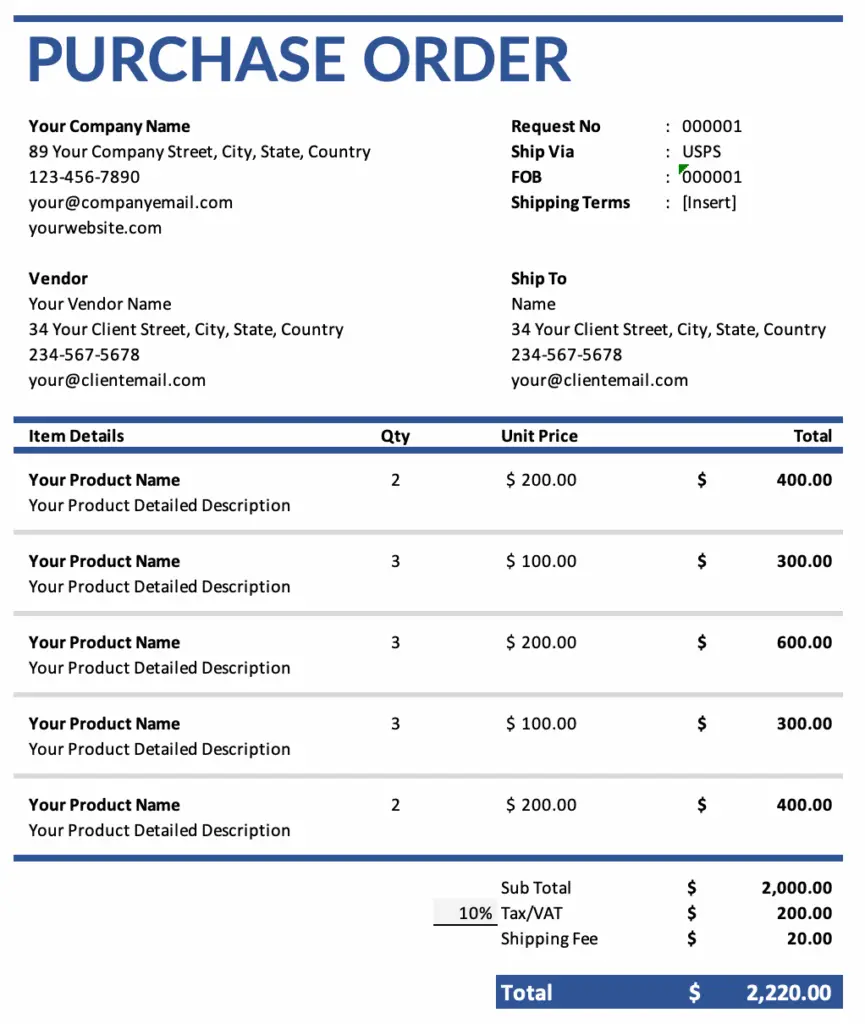
Key Information to Include on a Purchase Order
A good purchase order needs certain facts so everyone knows what's happening. This prevents confusion whether you're a small business buying office supplies or a wholesaler ordering thousands of units.
| Section | What to include |
|---|---|
| Buyer and supplier details | Full business names, addresses, and ways to contact both your business and the seller. Crucial for accurate shipping and billing. |
| Order number | A special PO number you give the order to keep track of it easily. Helps match POs to deliveries and invoices later for smooth reconciliations. |
| Order date | The day you make the purchase order. |
| Item list | SKU, description, quantity, unit price, and line total. What you're buying: SKU/item number (if any), description, quantity, unit price, and line total. Include details like size, color, or model if needed. |
| Subtotal, tax, and total | The order value before and after tax, discounts, or freight. Ensures you know the exact amount due and helps verify the seller's invoice later. |
| Payment method and terms | When and how you need to pay (like pay in 30 days). Avoids payment disputes and helps you manage your cash flow. |
| Delivery dddress | The address where you want the items sent and when you need them. Important for retailers needing stock by a certain date for a sale or wholesalers directing shipments to a specific warehouse location. |
Frequently Asked Questions
Answers to common questions about purchase orders, templates, inventory, and supplier purchasing.
What do you use a purchase order for?
A purchase order is used to formally document and confirm an order with a supplier before goods or services are delivered. It clearly outlines details such as items, quantities, prices, and terms, providing a precise agreement. Think of it as your official declaration stating, "I intend to purchase these items under these specific conditions."
Can I customize the PO template?
Yes, the Excel and Word versions of the PO template are fully editable. You can easily add your business logo, modify or add fields to fit your specific needs (such as product variations for retailers or specific shipping notes for wholesalers), and adjust the formatting as required.
What’s the difference between a PO and an invoice?
The buyer sends the seller a PO to place an order and document the agreed-upon terms before delivery. The seller sends the buyer an invoice to request payment after the order has been fulfilled and delivered. One initiates the purchase (PO), and the other requests payment for it (Invoice).
Learn more: Purchase Order vs Sales Order: What’s the Difference?
When should I switch to purchase order software?
Consider software when you create POs often, manage many SKUs or suppliers, receive partial orders, or buy for several locations. Try Vencru's order management software with inventory and accounting built-in.
Free Accounting & Billing Templates
Easily manage your finances, issue receipts, and send professional invoices with Vencru’s free templates and tools. Whether you're tracking expenses or creating an expense report - we’ve made it simple and fast.
Receipt generator
Add your logo, line items and tax, and download a branded PDF sales receipt in under a minute. Nothing to install.
Purchase order generator
Build a purchase order your supplier can act on — quantities, unit costs, delivery terms — and send it as a PDF.
Inventory
Log stock levels, reorder points and stock value across every product.
Excel · Google Sheets · PDF
Get the template →Accounting
Track income, expenses and profit in a sheet that's already set up for you.
Excel · Google Sheets · PDF
Get the template →Expenses
Record and categorise spend so nothing is missing when tax season lands.
Excel · Google Sheets · PDF
Get the template →Packing slips
List what's in every box so customers can check the order on arrival.
Excel · Google Sheets · PDF
Get the template →Get Simple Inventory & Accounting Software
Sign up today and take control of your business on the go.
With Vencru, you can: send professional invoices, view real-time sales reports, monitor inventory levels, track expenses easily, access accurate accounting statements
All in one place—anytime, anywhere.