
Track monthly retail and wholesale operating expenses separately from inventory purchases (COGS). Includes an Expense Log with sample rows and an auto-calculating SUMIF Monthly Summary tab.
Columns: Date, vendor, description and business purpose, category, payment method, receipt reference, amount (USD)
Using Google Sheets? Download the file, then choose File > Import > Upload. Formulas carry over cleanly.
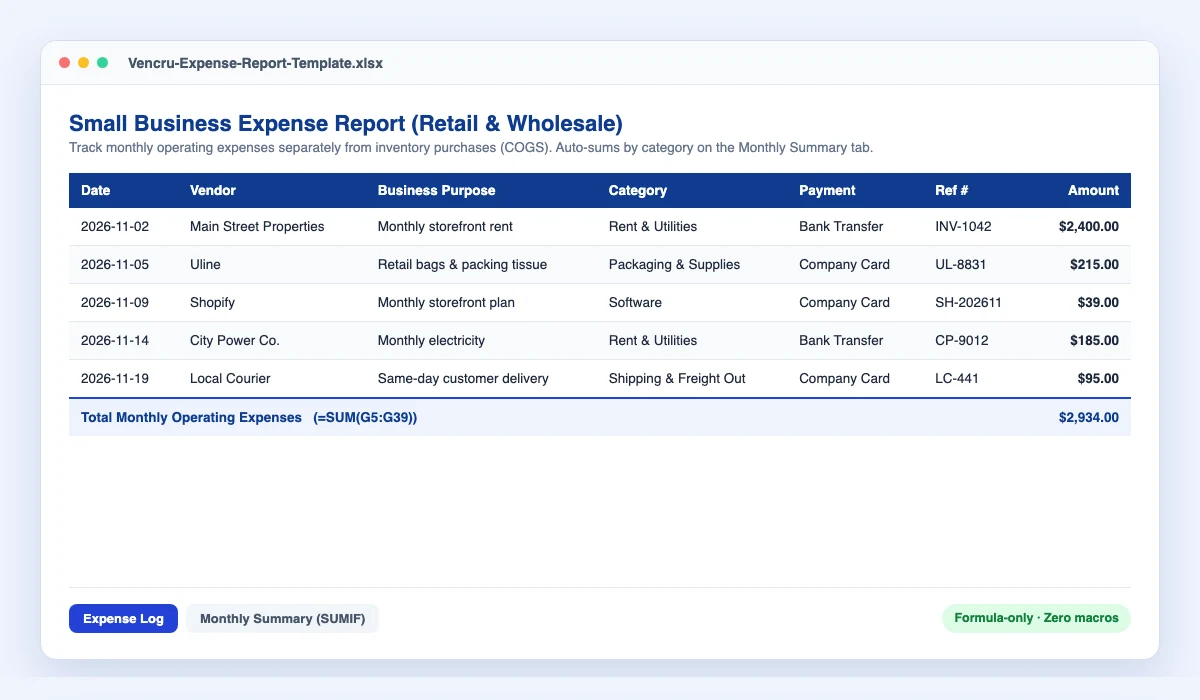
An expense report is a structured log of day-to-day business operating costs (such as rent, packaging, outbound freight, software, and utilities) grouped by date, vendor, business purpose, and category. An expense summary rolls those individual line items up by category so you can see total overhead and each category's percentage share of spending before closing your monthly income statement.
For retailers and wholesalers, keeping an accurate monthly expense summary is essential because mixing inventory purchases into operating expenses distorts gross margin and creates artificial profit swings.
Generic travel expense sheets rarely fit product businesses. Below are two worked monthly examples showing what belongs on an expense report and what stays off it as an inventory purchase.
| Date | Vendor | Business Purpose | Category | Payment | Amount (USD) |
|---|---|---|---|---|---|
| 2026-11-02 | Main Street Properties | Storefront rent | Rent & Utilities | Bank Transfer | $2,400.00 |
| 2026-11-05 | Uline | Shopping bags and tissue wrap | Packaging & Supplies | Company Card | $215.00 |
| 2026-11-09 | Shopify | Online store subscription | Software | Company Card | $39.00 |
| 2026-11-14 | City Power Co. | Showroom electricity | Rent & Utilities | Bank Transfer | $185.00 |
| 2026-11-19 | Local Courier | Same-day customer delivery | Shipping & Freight Out | Company Card | $95.00 |
| Total Monthly Operating Expenses | $2,934.00 | ||||
During the same month, the boutique also bought $6,200 of seasonal inventory from suppliers. That $6,200 stays off the operating expense report: it sits on the balance sheet as an Inventory Asset when received and moves into cost of goods sold (COGS) only as items are sold.
| Date | Vendor | Business Purpose | Category | Payment | Amount (USD) |
|---|---|---|---|---|---|
| 2026-11-03 | Metro Industrial Park | Warehouse lease | Rent & Utilities | Bank Transfer | $3,800.00 |
| 2026-11-07 | Regional LTL Freight | Outbound pallet delivery to buyer | Shipping & Freight Out | Company Card | $640.00 |
| 2026-11-12 | Crown Lift Service | Forklift inspection and tune-up | Equipment & Repairs | Company Card | $310.00 |
| 2026-11-18 | BoxMart | Pallets, shrink wrap, and shipping labels | Packaging & Supplies | Company Card | $425.00 |
| 2026-11-22 | Trade Expo LLC | Regional wholesale trade show booth | Marketing & Sales | Company Card | $750.00 |
| Total Monthly Operating Expenses | $5,925.00 | ||||
The distributor's $18,500 pallet restock is likewise recorded through purchase orders and vendor bills as Inventory Asset rather than dumping $18,500 into November overhead. Keeping those two buckets separate prevents November from looking unprofitable while December looks artificially inflated when those pallets ship out.
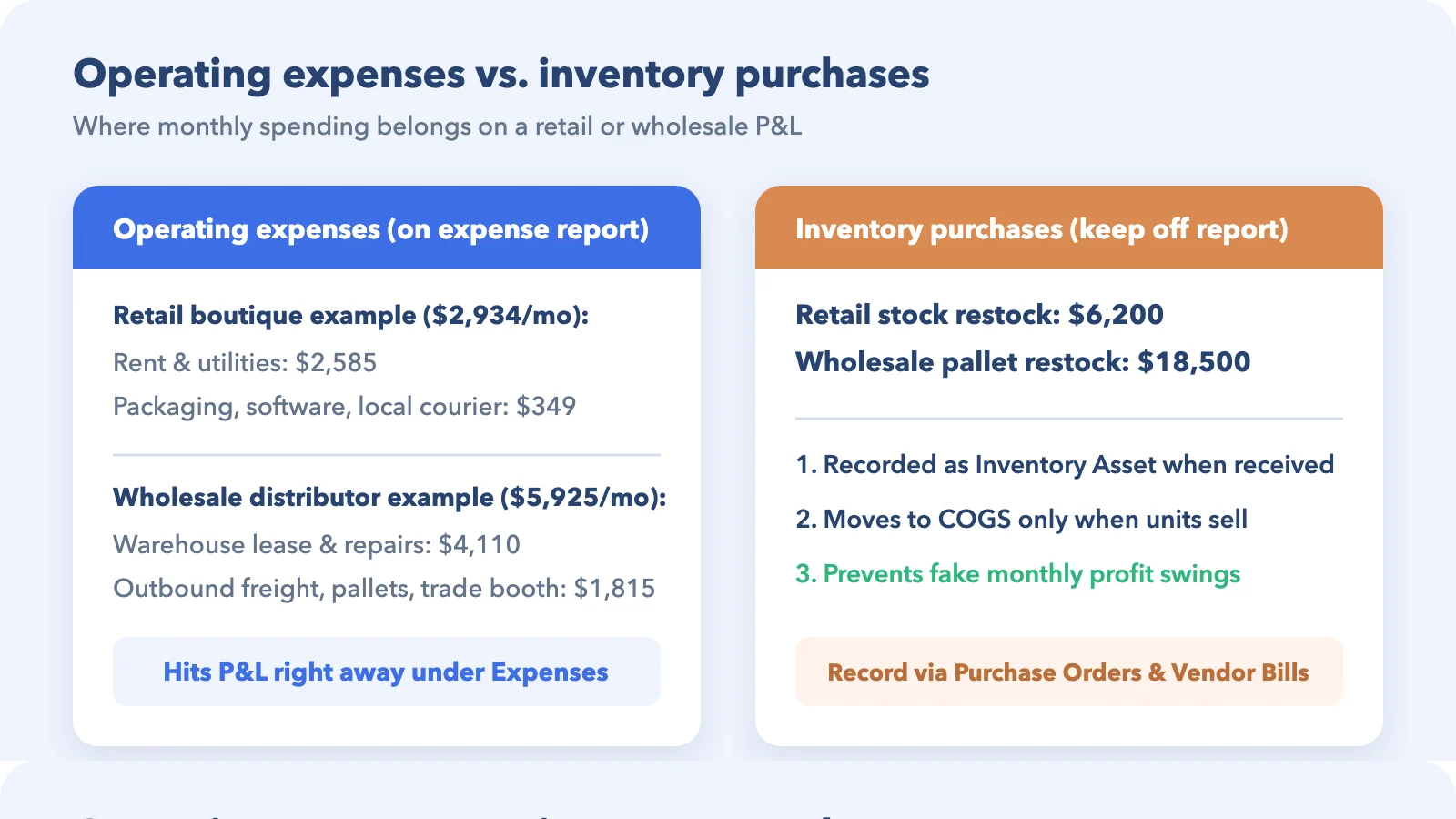
Every row in the template captures seven fields: Date, Vendor/Merchant, Description and Business Purpose, Category, Payment Method, Receipt Ref/#, and Amount. Recording a brief business purpose (for example, "outbound pallet delivery for order #418" or "regional trade show booth") protects deductions if an auditor asks why a charge was incurred.
Use consistent category names in column D so the Monthly Summary tab totals them automatically with =SUMIF(). Put store rent, utilities, warehouse equipment maintenance, software, marketing, and outbound delivery costs on this sheet; track merchandise restocks in your inventory templates or purchasing ledger so unit costs flow into COGS when goods leave your shelf.
At month end, open the Monthly Summary tab and compare each category's percentage share against prior months. If packaging or outbound freight climbs faster than sales volume, you spot carrier surcharges or box-size waste within 30 days instead of discovering it at year end.
A spreadsheet works well when you log 20 to 40 receipts a month. Once you have multiple staff members buying supplies, recurring vendor bills, and hundreds of invoices plus stock movements, typing receipts into Excel every Friday turns into a bottleneck and still leaves your books disconnected from your inventory.
Outgrowing your expense spreadsheet? Vencru's expense management software lets you record operating expenses, attach receipt images, track vendor bills, and post every entry directly into double-entry accounting reports alongside your sales and stock counts.
Start 14-day trial 14-day trial · No credit card required
No. For accrual and perpetual inventory accounting, merchandise bought for resale is recorded as an Inventory Asset on the balance sheet when received, then expensed as Cost of Goods Sold (COGS) when sold. Putting bulk restocks onto an operating expense sheet skews your monthly profit and loss statement.
Yes. Download the .xlsx file, go to Google Sheets, choose File > Import > Upload, and upload the workbook. Because it uses standard SUM and SUMIF formulas with no macros, every total calculates automatically in Google Sheets.
In the United States, IRS Publication 583 requires supporting documents (invoices, paid bills, receipts, bank or card statements) that show the amount, date, payee, and business purpose; general retention is at least 3 years from filing (4 years for employment taxes, 6 years if income is underreported by more than 25%).
In Canada, the Canada Revenue Agency (CRA) requires keeping supporting business records and receipts in paper or readable electronic form for at least 6 years from the end of the last tax year they relate to.
Operating expenses paid on the spot (card or cash) go straight onto your expense log, while supplier invoices with Net 15 or Net 30 terms should be tracked in accounts payable so you know what is due and when. You can pair this sheet with our free aging report template or manage expenses, vendor bills, and inventory together inside Vencru.